Browser extension · Chrome

Enlyft, on every page you research.

See what Enlyft knows about a company while you’re on its website or a prospect’s LinkedIn profile. For Chrome, signed in with your Enlyft account.

Requires an Enlyft account.

dropbox.com
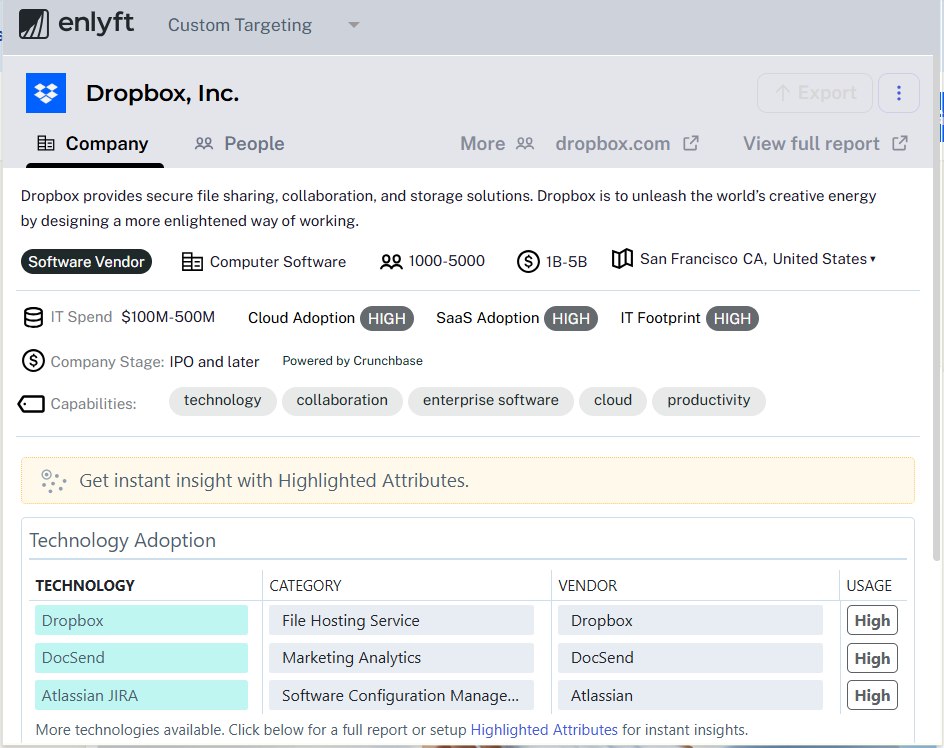
The Enlyft extension panel on dropbox.com, showing Dropbox's company details, IT spend, cloud and SaaS adoption, company stage, capabilities and technology adoption

The Enlyft extension on dropbox.com

Where you already work

Your research already happens in a browser.

Before a call you check the company’s website and the prospect’s profile. Enlyft already holds the account picture for that company, and the extension puts it on the page you’re reading.

On a company website

The account picture, on their homepage

Visit any company’s site and open the extension to see what it runs, who it is, and how big it is, without switching tabs.

On a LinkedIn profile

The company behind the prospect

Open a prospect’s profile and see their company’s Enlyft record: whether it matches your ideal customer profile, and other people there in the roles you sell to, with contact details from your subscription.

Why they’re worth a call is in the account in Enlyft, built on what it runs today and the 50+ first-party signals tracked on it.

What you see

What you see on a company

01

Technographics

What it runs

The technologies a company runs, drawn from 24,000+ technologies tracked across 45M+ companies.

02

Firmographics

Who it is

Its location, industry, size, revenue and company stage. The same account data you see in Enlyft, because it comes from the same subscription.

03

The opening

Where the case starts

What a company runs tells you which vendor lines it already uses, and that is where the case for an account starts.

Your stack

Works with the stack you already run.

The extension runs on a company’s own website and next to the sales software you already have open. Keep your CRM and your contact-data provider. Enlyft’s account view sits beside them while you work.

Keep your CRM Keep your contact data Add Enlyft in the browser

Setup

Set up in your browser

1

Install it from the Chrome Web Store, or choose Download Extension from the user menu in Enlyft.

2

Sign in with your Enlyft credentials.

3

Admins can turn on the Chrome extension under Admin > Integrations.

You need an Enlyft account. The extension shows what your subscription covers, not more.

Who it’s for

Who it’s for, and where it fits

Sellers at technology channel partners (MSPs, VARs, systems integrators and distributors) and at the technology vendors they sell for.

Platform · 1

Finds the accounts ready to buy

Platform · 2

Picks the play for each one

Platform · 3

Identifies the contacts that play calls for

Platform · 4

Drafts the outreach to match

The extension

Carries that account data into your browser

On the company’s site and the prospect’s profile.

FAQ

Questions about the extension

What does the Enlyft browser extension show about a company?

The technologies a company runs, drawn from 24,000+ technologies tracked across 45M+ companies, along with its location, industry, size, revenue and company stage. It is the same account data you see in Enlyft, because it comes from the same subscription.

Which browser does the Enlyft extension work in?

Chrome. Install it from the Chrome Web Store, or choose Download Extension from the user menu in Enlyft, then sign in with your Enlyft credentials.

Do I need an Enlyft account to use the extension?

Yes. You sign in with your Enlyft credentials, and the extension shows what your subscription covers, not more.

How does the extension fit with the rest of Enlyft?

In the platform, Enlyft finds the accounts ready to buy, picks the play for each one, identifies the contacts that play calls for, and drafts the outreach to match. The extension carries that account data into your browser.

Get the extension

The research is already in Enlyft. The extension brings it to the page.